The whiteboard for teams of people and AI agents.
Brainstorm, plan and diagram with your teammates and the agents you already use. Claude, ChatGPT, Cursor or your own agents join the board as real participants: they read it, propose changes you approve, and keep Jira in sync. Free and open source, and yours to host.
Set up in a few minutes: Claude · ChatGPT · Cursor, VS Code and any MCP client
How it works
One board for the whole loop: people think together, an agent does the legwork, people decide, and the result lands in the tracker your team already uses.
Think together on the board
Sticky notes, frames, connectors and diagrams, live for everyone in the room or across time zones.
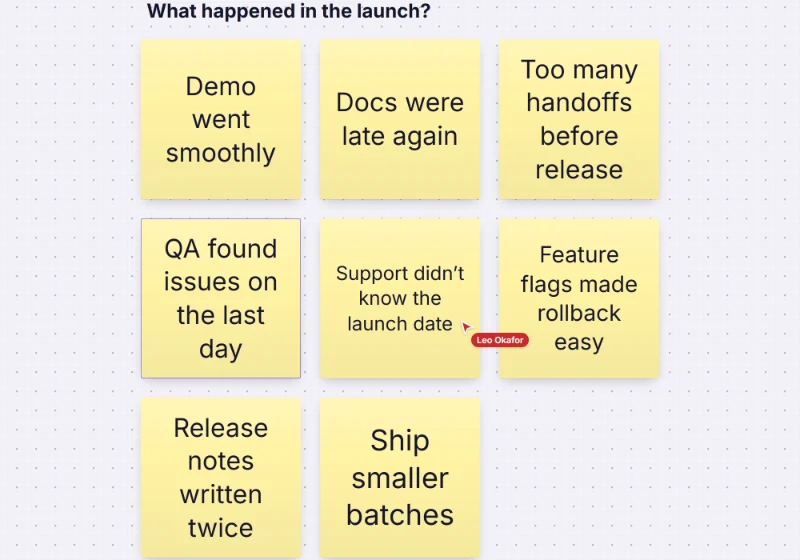
Ask your agent
“Group these notes into themes.” Claude, ChatGPT or your own agent reads the board and works out a proposal.
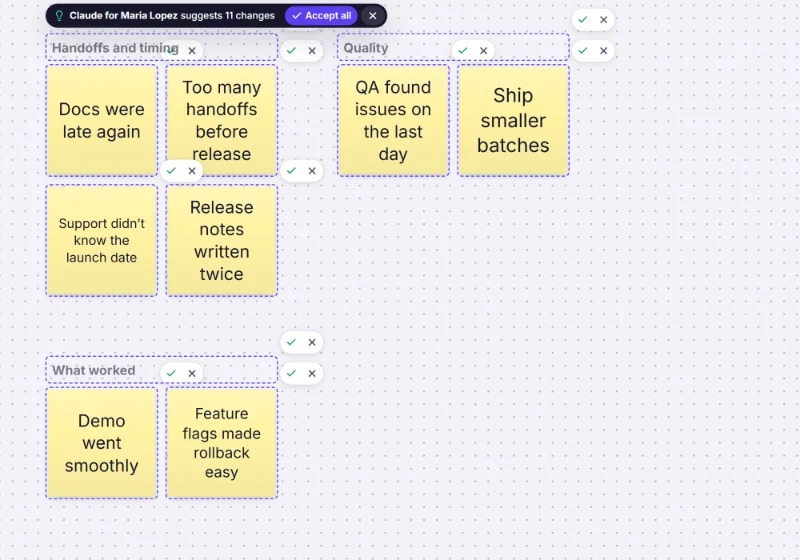
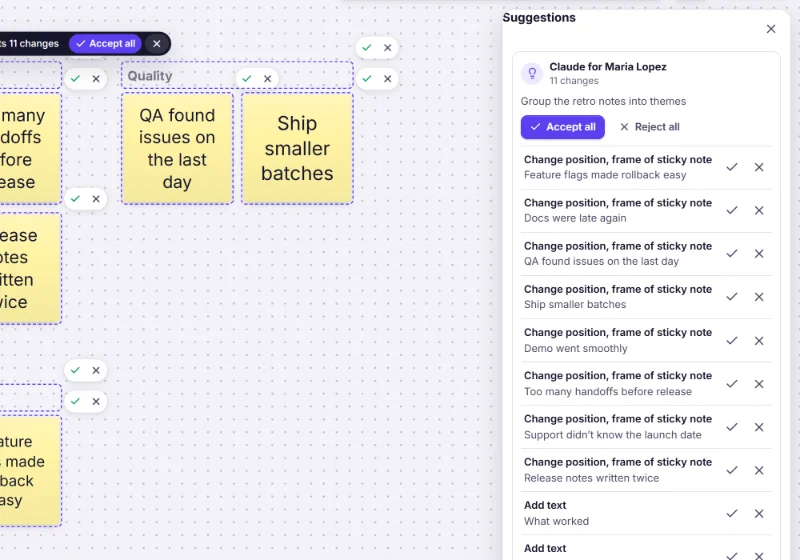
Review what it proposes
Nothing changes until someone accepts. Take the whole proposal, part of it, or none, and undo it in one step.
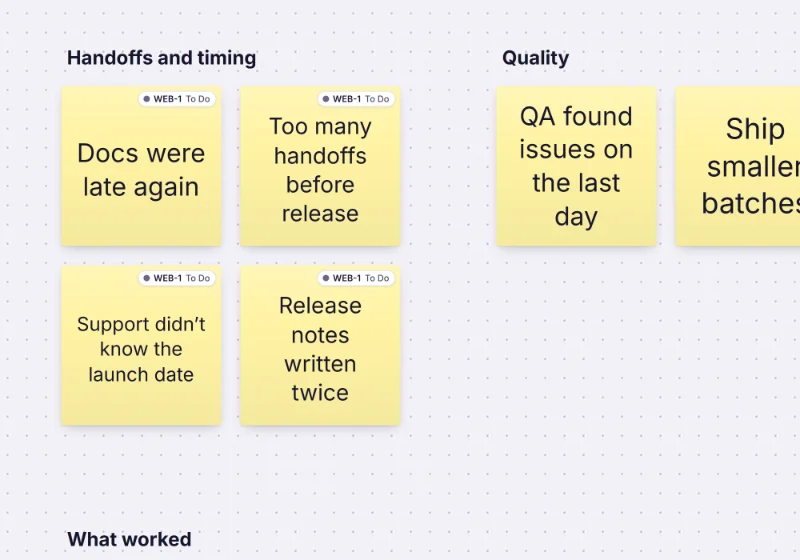
Send it to the tracker
A cluster of notes becomes one Jira, Linear or GitHub issue with a link back to every note, and both stay in sync.
Agents work on the board like teammates
You always know what an agent did, for whom, and why it was allowed to. And you stay the one who decides.
Present on the board
While an agent writes, it appears in the board’s presence list with its own cursor and selection, so people see where it is working.“Claude for Maria”
Every item an agent creates carries its name and the name of the person it works for, stamped by the server so nobody can fake it: on the item, in the activity feed and in the board outline.Suggestions you accept
By default agents propose instead of changing things. Owners and editors see the proposal as ghosts on the board and accept or reject each change, or all of it.One step to undo
Accepting a proposal is a single step in your undo history, and version history can bring back any earlier state of the board.Every call on record
Each tool call is in the audit log with the app, the person it acted for, the board and the outcome: the team’s log for team boards.Limits per agent
Each connection has its own request and write budget, separate from people’s editing, so a runaway agent never slows the room down.
Bring any agent
One MCP endpoint for every assistant, plus a REST API and webhooks for everything else. Your board’s address is https://freero.app/mcp.
Claude
Add Freero as a custom connector in Claude, or with one command in Claude Code. Claude reads, builds and proposes on your boards.ChatGPT
Add Freero to ChatGPT as a custom MCP server and work on your boards from a chat, with the same permissions and the same review.Cursor, VS Code and other clients
Any client that speaks MCP over HTTP signs in with OAuth, or uses a personal access token on a server.Your own agents
The REST API, OAuth apps and signed webhooks let your services read boards, propose changes and react to what people do.
The board, live in the chat. Freero supports MCP Apps: in assistants that show interactive views, asking to open a board brings the live board into the conversation, where you can look around, edit if you allowed it, accept suggestions and share it with your team.
Built-in AI on your own model. Freero’s AI actions (generate ideas, cluster, summarise, diagram from text) run on the provider you choose: Anthropic, OpenAI or any OpenAI-compatible endpoint, including a model you host. You pay your provider directly; Freero adds no AI surcharge.
Safe by design
Agents get exactly the access you give them, and board content can’t talk them into more.
Read and suggest by default
A new connection can read and propose. Changing boards directly and commenting are opt-in, and never go beyond your own role on the board.Board text is data, not instructions
Everything people wrote reaches an agent inside a marked, untrusted envelope, so a sticky note can’t pose as instructions from you.Private stays private
An agent sees the board as the person it works for does: other people’s private drafts and frames hidden from them never leave the server.Scoped, revocable tokens
OAuth 2.1 with PKCE, tokens bound to the MCP server, and personal tokens with exactly the permissions you pick. Pause or revoke any of them.Kill switches at every level
Disconnect one app, all of yours at once, block an app for a whole team, or turn the API off for the instance. Effective on the next request.Deletes need a yes
Destructive calls do nothing unless the agent confirms explicitly, and agents are told to ask you first.
From board to done
Planning ends up in the tracker. Freero keeps the board and the issues in step, in both directions.
- A cluster becomes one issue. Send a group of sticky notes as a single issue that lists every note with a link back, or one issue per note.
- Fields survive the trip. Title, description, labels, status, assignee, start and due dates and estimates map to the tracker’s own fields.
- Live on the board. Each linked note or card shows the issue’s key, status and assignee, updated when the issue changes.
- Jira Cloud and Jira Data Center, Linear, and GitHub including GitHub Enterprise Server.
- Import issues as cards from a query, or onto a timeline as a roadmap with lanes per epic, team or label.
- Agents can do it too: ask Claude or ChatGPT to send a cluster to Jira and it uses the same sync.
Jira planning on a whiteboard · Roadmaps from Jira and Linear · An agent control room
The full whiteboard
Everything a team expects from an online whiteboard, built in and free.
Infinite canvas
Pan and zoom, frames, snapping and alignment guides, minimap, groups, locks, copy and paste between boards.Notes, shapes and ink
Sticky notes, text, shape sets for flowcharts, UML, BPMN, ERD, networks and wireframes, an icon library, pen and highlighter.Diagrams
Attached, labelled connectors, mind maps, swimlanes, auto-layout and org charts, and diagrams from Mermaid text.Structured content
Tables with typed columns and a board view, kanban columns, task cards, timelines and Gantt bars, code blocks.Real-time together
Live cursors and selections, follow someone, bring everyone to you, reactions, comments with mentions and notifications.Present and share
Slides made from frames with layouts and speaker notes, presentation mode, roles per board, share links with a password or expiry.Docs and files
Collaborative docs with live boards inside them, Markdown in and out; images, PDFs, video and audio, file cards and link previews.Templates and export
584 original templates. Export to PNG, JPG, SVG or PDF, CSV for notes and cards, version history.
Keyboard and screen-reader support aims at WCAG 2.1 AA, with a “board as list” view; it works on phones and tablets and installs as an app.
Built for workshops
Facilitation tools that keep a session honest and moving, with no extra app to buy.
Private mode
Everyone writes alone until the facilitator reveals all notes at once. The server keeps drafts from other participants, not just the screen.Dot voting
A set number of votes per person, hidden until the results are shown, then a ranked list.Planning poker
Estimate cards one by one with Fibonacci, T-shirt or custom decks; picks stay sealed until the reveal and the agreed value lands on the card.Guided retros
Write privately under a timer, reveal and group, vote, discuss, and turn the result into action-item cards.Polls and Q&A
Polls, word clouds, rankings, rating scales and Q&A, answered from the board or a phone, with results drawn on the board.Timer, laser and follow
A shared countdown, a laser pointer, presenter notes, and an audience that follows the presenter. Guests can join by link without an account.
Enterprise-grade, and still free
The controls a security review asks for are part of every Freero, not an upsell.
Single sign-on
SAML 2.0 and OpenID Connect per workspace, verified domains, and SSO you can enforce.SCIM provisioning
SCIM 2.0 users and groups from your identity provider, with deprovisioning that ends sessions and tokens.Audit log
Append-only and hash-chained per workspace, with filters, CSV or JSON export and an integrity check.Admin console
Members and roles, sharing and download policies, session limits, API and app controls, usage.Retention
Per-workspace retention for the trash, version history and the audit log.GDPR exports
Personal and whole-workspace data exports, and self-service account deletion.MIT licence
Read the code, change it, run it. No open-core edition, no licence key.Self-host
One Docker image, from a laptop to several instances behind a load balancer.
Security details · Open source and self-hosting · What free means
Frequently asked questions
Is Freero really free?
Yes. There is no paid plan, no seat count and no feature behind a paywall: SSO, SCIM, the audit log and the admin console are included. A Freero server has fair-use limits by default (upload storage, request rates), listed on the pricing page. Freero is MIT licensed, so you can also run it on your own servers.
What does it mean that agents are teammates on a board?
An AI assistant you connect works on the board the way a colleague does, with your permissions: it reads the board, adds or proposes changes, shows up with its own cursor while it writes, and everything it adds is labelled with its name and yours, such as "Claude for Maria". By default it can only read and propose; people accept or reject what it suggests.
Which AI assistants and agents work with Freero?
Any client that speaks the Model Context Protocol (MCP) over HTTP: Claude (web, desktop and Claude Code), ChatGPT (as a custom MCP server), Cursor, VS Code with GitHub Copilot, and agents you build yourself. Scripts and services can use the REST API and webhooks instead.
Can an agent change my board without me knowing?
Not by default. A new connection can read boards and propose changes, nothing more; changing boards directly and commenting are separate permissions you tick on the consent screen. Whatever an agent does is labelled with its name, shown in the board’s activity feed and recorded in the audit log, and you can disconnect it at any time.
Does Freero send my boards to an AI model?
Only when someone asks it to, and only to the provider you chose. Freero has no model of its own. The built-in AI actions are off until an operator or a workspace admin connects a provider (Anthropic, OpenAI or any OpenAI-compatible endpoint, including one you run yourself). Agents you connect over MCP read what your permissions and the board allow, never other people’s private drafts.
Can I host Freero myself?
Yes. Freero is open source under the MIT licence and ships as one Docker image. A Docker Compose file runs the whole stack on one machine, and the same image scales out behind a load balancer with PostgreSQL, Redis and S3-compatible storage. The MCP server, REST API, tracker sync and SSO are part of every installation.
Does the Jira sync work with Jira Data Center?
Yes. Freero connects to Jira Cloud and to Jira Data Center or Server with a personal access token, as well as to Linear, GitHub and GitHub Enterprise Server. Changes flow both ways: from the board to the issue and from the issue back to the board.
Bring your team and your agents to one board
Free to use, open source, and yours to host. No credit card, no seat count.